> For the complete documentation index, see [llms.txt](https://docs.gaiodataos.com/llms.txt). Markdown versions of documentation pages are available by appending `.md` to page URLs; this page is available as [Markdown](https://docs.gaiodataos.com/settings/tags-and-access-control.md).
# Tags & Access Control
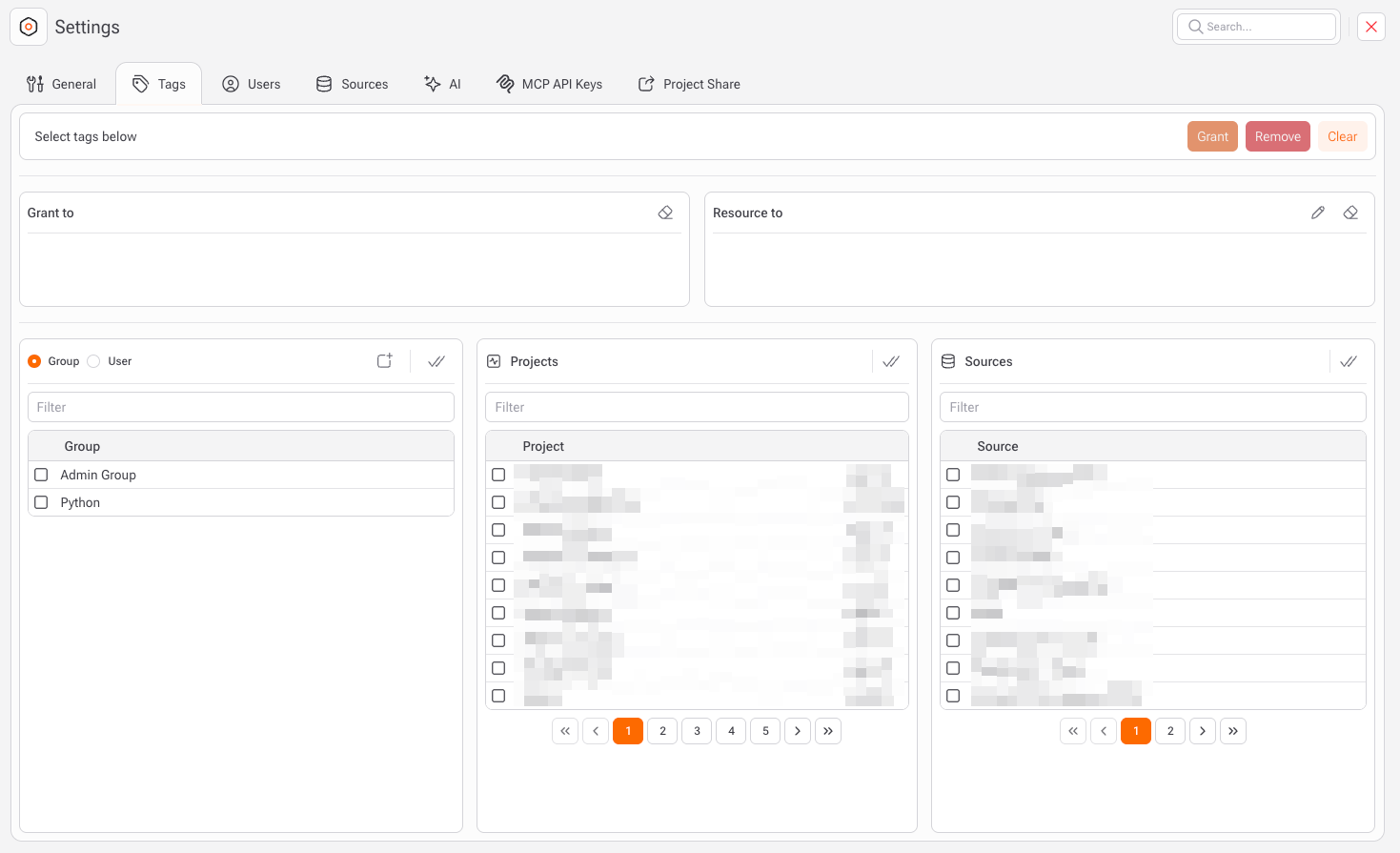
The **Tags** section allows administrators to control **access permissions** across the platform by assigning tags to users, groups, projects, and sources. This mechanism enables **fine-grained authorization**, making it possible to define who can access what, without hardcoding permissions at the resource level.
Tags act as **permission bridges** between:
* **Who** (users or groups)
* **What** (projects or data sources)
Once a tag is granted, any user or group associated with that tag gains access to the selected resources.
### How to grant access to a project
1. Defines who will receive access. You can grant tags to:
1. **Groups** (recommended for scalable access control)
2. Individual users
2. Defines **which resources will be accessible**. Supported sources:
1. Projects
2. **Sources** (databases, files, APIs, connectors)
3. Click **Grant** to apply permissions
### Common Use Cases
* Restrict sensitive data sources to specific teams.
* Grant read/write access to analytics projects by department.
* Manage multi-tenant environments with isolated permissions.
* Simplify onboarding by assigning users to pre-configured groups.