> For the complete documentation index, see [llms.txt](https://docs.gaiodataos.com/llms.txt). Markdown versions of documentation pages are available by appending `.md` to page URLs; this page is available as [Markdown](https://docs.gaiodataos.com/settings/mcp-api-keys.md).
# MCP API Keys
The **MCP API Keys** section allows you to create and manage secure access keys used by **MCP tools and integrations** within Gaio DataOS. These keys control which projects can access MCP-enabled capabilities and external integrations.
***
### What is an MCP API Key?
An MCP API Key is a **project-scoped authentication token** used to:
* Authorize MCP tools
* Enable secure communication between Gaio and external MCP-compatible services
* Control access at the project level
Each key can be independently enabled, rotated, and assigned to one or more projects.
***
### Viewing Existing MCP API Keys
Navigate to:
**Settings → MCP API Keys**
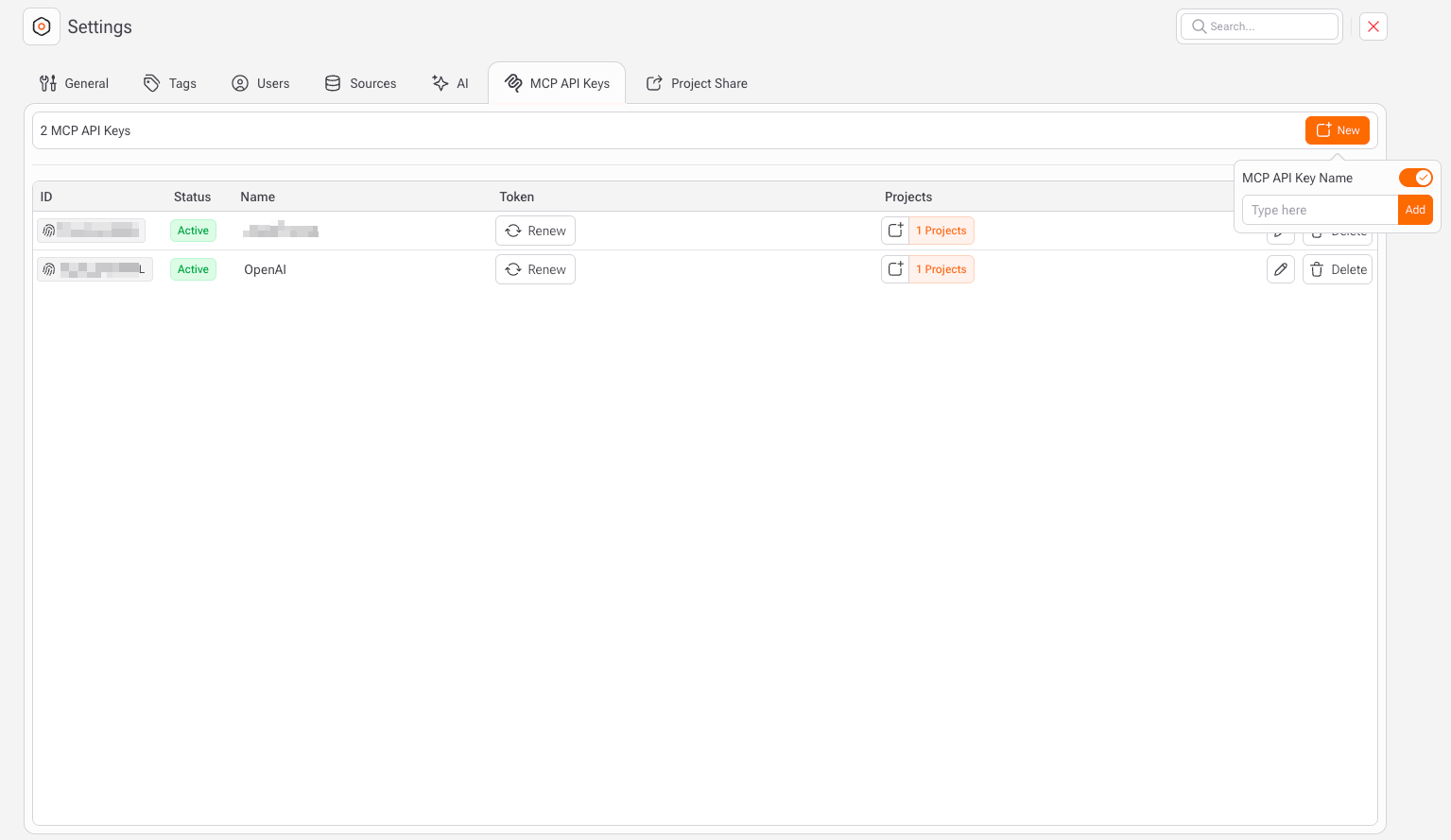
In this screen, you will see a list with the following columns:
* **ID**\
Internal identifier of the key.
* **Status**\
Indicates whether the key is:
* `Active` – Key can be used normally
* `Inactive` – Key is disabled and cannot be used
* **Name**\
Human-readable name to identify the purpose of the key (e.g., *OpenAI*, *Internal MCP*, *Automation Key*).
* **Token**\
The secret value used for authentication.
* Tokens are hidden by default
* You can **Renew** the token at any time
* **Projects**\
Number of projects where this key is enabled.
***
### Creating a New MCP API Key
1. Click **New**
2. Fill in the following field:
* **MCP API Key Name**\
A descriptive name for the key
3. Toggle the **Status** to `On` if you want the key active immediately
4. Click **Add**
The key will be generated automatically.
***
### Assigning Projects to an MCP API Key
After creating the key:
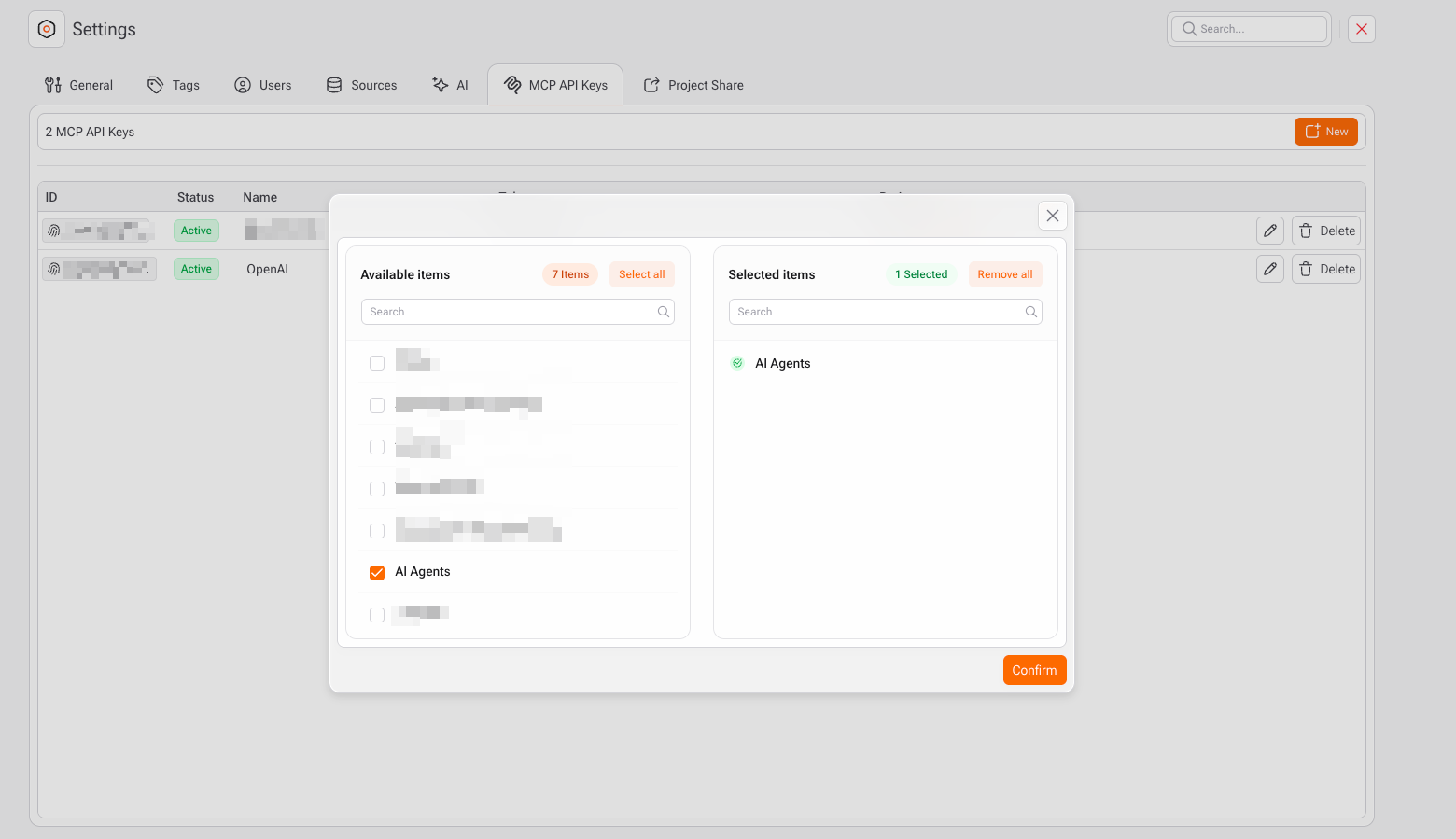
1. Click on the **Projects** badge
2. Select one or more projects
3. Confirm the assignment
Only the selected projects will be able to use this MCP API Key.
***
### Renewing an MCP API Key
If a token is compromised or needs rotation:
1. Locate the key in the list
2. Click **Renew**
3. A new token will be generated
4. Update any external systems that depend on this key
{% hint style="danger" %}
Renewing a token immediately invalidates the previous one.
{% endhint %}
***
### Editing or Deleting a Key
* **Edit**\
Allows you to update the key name or assigned projects.
* **Delete**\
Permanently removes the key.
* Any integration using this key will stop working immediately.
***
### Best Practices
* Use **one MCP API Key per integration or purpose**
* Assign keys only to the **projects that truly need access**
* Rotate keys periodically using **Renew**
* Disable or delete unused keys
* Never share tokens in public repositories or client-side code
***
### Security Notes
* MCP API Keys are stored securely and masked in the UI
* Tokens are only shown at creation or renewal time
* Access is enforced at the **project level**
* Keys can be revoked instantly by disabling or deleting them
***
{% hint style="info" %}
MCP API Keys provide a **controlled, auditable, and secure** way to connect Gaio DataOS with MCP-enabled tools and external systems.
{% endhint %}